
Base Dispenser
One terminal for every chest around your base – plus quick-deposit at the press of a key, with locked slots that never move.
Overview
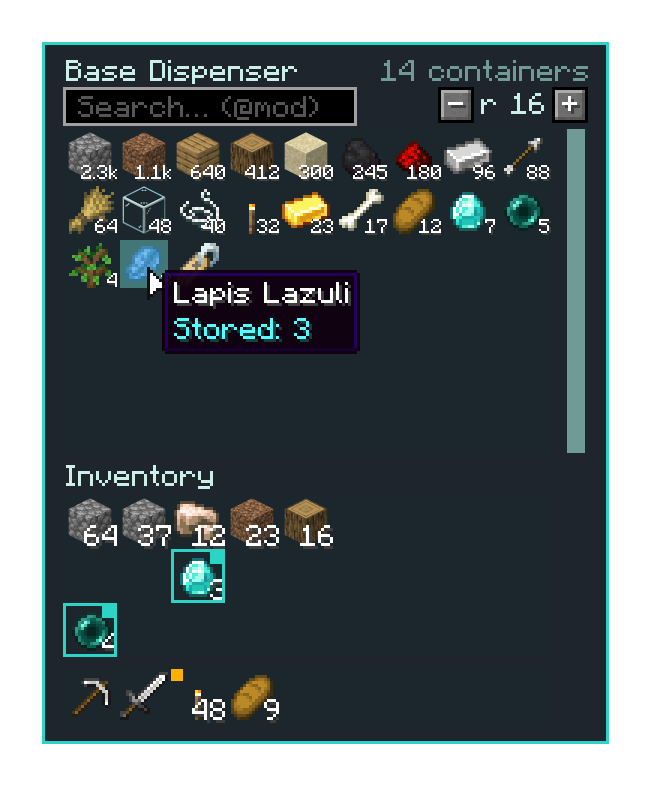
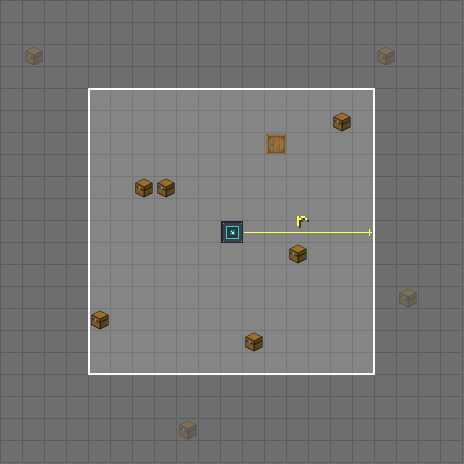
The Base Dispenser is a block that combines all containers within a cube-shaped radius into one big storage. Right-click opens the terminal: there you see every item type from all chests, barrels and shulker boxes at a glance – added up, sorted by amount and searchable. Taking out and storing works right in the terminal.
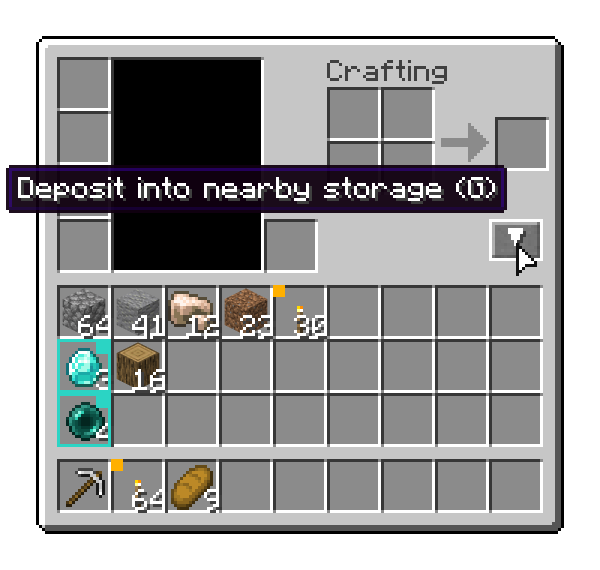
On the go, the Dispenser Remote helps, and with G you deposit your inventory into the chests around you – slots and item types you want to keep stay where they are.
Terminal for all containers
Chests (#forge:chests), barrels (#forge:barrels) and shulker boxes within the radius (default 16 blocks, adjustable with + / −) become one list. Furnaces, hoppers and machines deliberately don't count.
Search & sort
Items are added up per type (1.2k, 3.4M) and sorted by amount. The search field filters by name, @mod filters by mod.
Smart storing
New items go first into containers that already hold that type, then into the next free space – nearest containers first. Shulker boxes never go into shulker boxes.
Remote
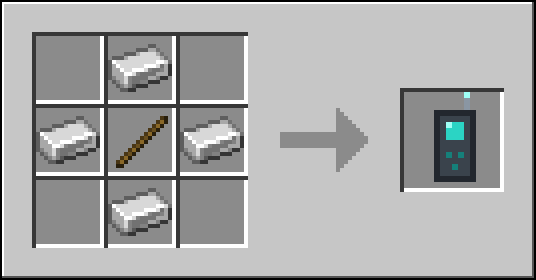
Bind it to the dispenser once, then a right-click opens the terminal from anywhere – even from other dimensions (can be turned off).
Quick-deposit
G or the ▼ button in the inventory clears your inventory into the containers around you (default 12 blocks). By default the hotbar is left alone.
Lock slots
K over a slot locks it (teal frame), Shift+K always keeps an item type (yellow corner). Saved on the player and survives death.
Preview
Controls
| Input | Effect |
|---|---|
| Right-click the Base Dispenser | open the terminal |
| Terminal: left-click an item | take the whole stack onto the cursor |
| Terminal: Shift + left-click | stack straight into the inventory |
| Terminal: right-click an item | take a single item |
| Terminal: item on the cursor, click into the grid | store it (right-click: just one) |
| Terminal: Shift + click in your own inventory | store the stack |
| Terminal: mouse wheel / scrollbar | scroll through the list |
| Terminal: + / − (with Shift: ±8) | change the dispenser's radius |
| Terminal: search field | filter by name, @mod filters by mod |
| Sneak + right-click a dispenser with the remote | bind the remote (it then glints) |
| Right-click with the remote | open the terminal of the bound dispenser |
| G (in game or in the inventory) or the ▼ button in the inventory | deposit into containers within the radius |
| K over an inventory slot | lock / unlock the slot |
| Shift + K over an item | always keep this item type / stop keeping it |
The keys G and K can be changed under Options → Controls → Base Dispenser.
Items & Recipes
Block · needs a pickaxe

does not stack
Recipes
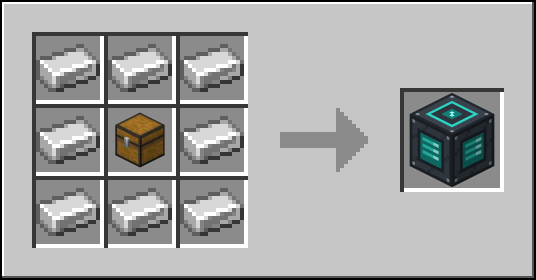
Any wooden chest works instead of the oak chest.Crafting Table · rendered from the game textures
Settings
Every option can be changed in game: Mods → Base Dispenser → Config (via Kobase Core). Server options apply to all players; client options are set by each player – options marked lockable can be fixed by the server for everyone.
| Option | Meaning | Default |
|---|---|---|
Max. terminal radiusterminal.maxRadiusSERVER | Largest radius (blocks, cube around the dispenser) players can set in the terminal. | 32 range 1 – 64 |
Default terminal radiusterminal.defaultRadiusSERVER | Radius of a freshly placed dispenser. | 16 range 1 – 64 |
Remote works across dimensionsterminal.remoteCrossDimensionSERVER | Whether a bound remote opens its dispenser from another dimension. | on |
Allow quick-depositdeposit.enabledSERVER | Whether quick-deposit is available at all. | on |
Max. deposit radiusdeposit.maxRadiusSERVER | Largest quick-deposit radius (blocks, cube around the player). | 16 range 1 – 48 |
Deposit the hotbar toodeposit.includeHotbarSERVER | Quick-deposit also empties the hotbar (locked slots and kept items are always skipped). | off |
Extra storage blocks (ids)storage.extraStorageBlocksSERVER | Comma-separated block ids, e.g. somemod:crate | empty |
My deposit radiusdeposit.radiusCLIENTlockable | Your quick-deposit radius (blocks). The server caps it at its max. deposit radius. | 12 range 1 – 48 |
Mark locked slots / kept itemsinventory.markersCLIENTlockable | Mark locked slots and kept item types in inventories. | on |
Deposit button in inventoryinventory.depositButtonCLIENTlockable | Show the deposit button in the player inventory. | on |
Compatibility
| Minecraft | 1.20.1 |
|---|---|
| Mod loader | Forge 47 or newer |
| Kobase Core | included in the mod jar (1.0.1 up to (not incl.) 2.0.0) – nothing extra to install |
| Installation | On client and server (one jar for both). |
| Modpacks | CJ_SimpleMod · Modpack D+J |
Versions
- v1.0.0 First release: Base Dispenser with terminal, remote, quick-deposit (G) and slot locking (K).
- v1.1.0 In-game settings via Kobase Core (included in the jar); new options: quick-deposit can be turned off, slot markers and ▼ button can be hidden, client options can be locked by the server.
- v1.1.1 Translations: all texts of the mod and its settings in 13 languages; with Kobase Core 1.0.3.
- v1.1.2 Settings: missing tooltips/labels added in all languages.