
[RKD] Manipulator
Edit items and blocks in game – names in any colour, enchantments, attributes, armour looks and trims in a free colour, potions, fireworks, banners, signs – with a live 3D preview. The server checks every change.
Overview
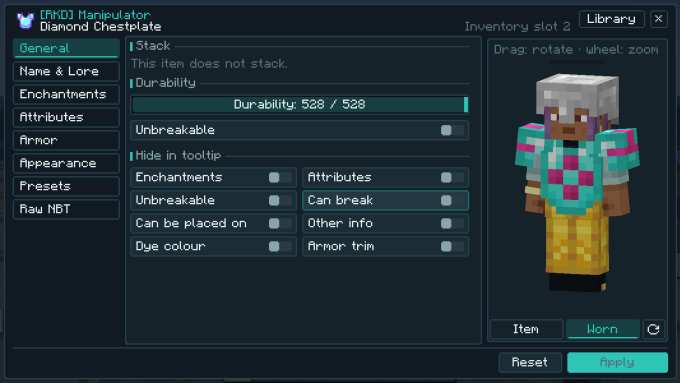
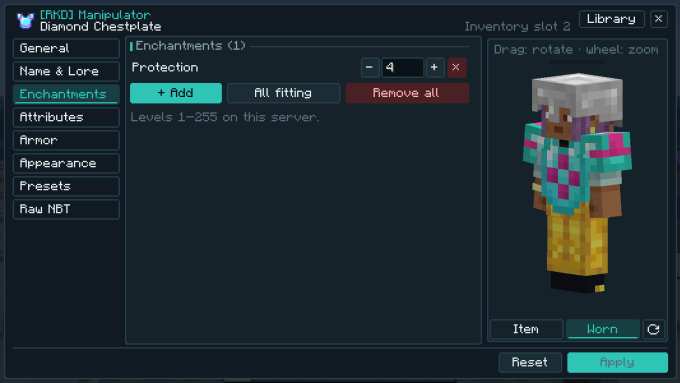
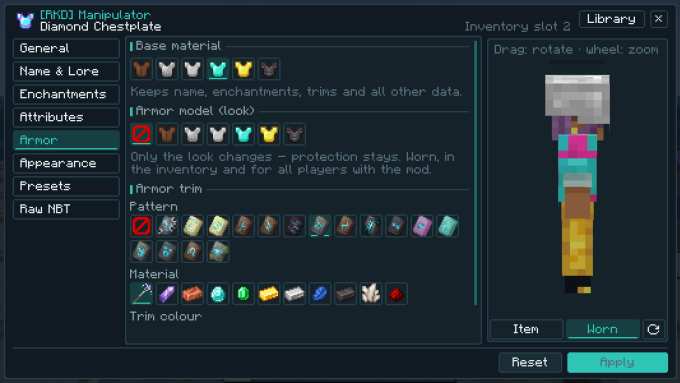
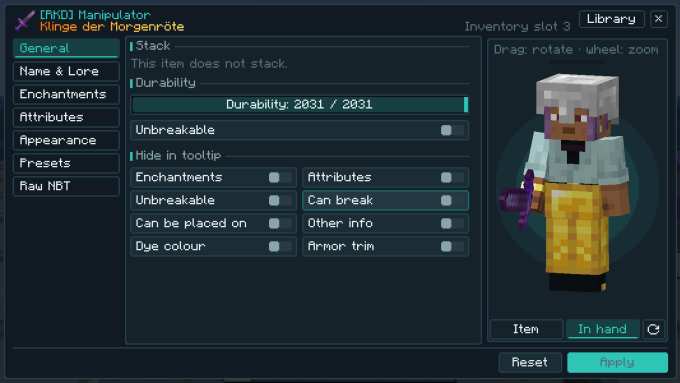
With the Manipulator in your hand you click an item on the ground, a block, an item frame or an armour stand – or drop it onto an item in your inventory like a bundle. An editor opens: tabs on the left, settings in the middle, the live preview on the right – armour worn on a figure with your own skin, weapons in the hand, blocks as a 3D block.
Everything goes through the server: it builds the result from its own item and only takes over what is allowed – with limits, deny lists and separate rules for survival mode, where changes cost experience levels.
Name & text
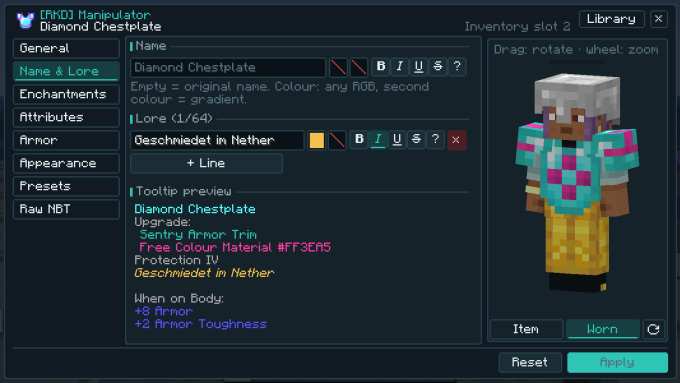
Name and lore lines in any RGB colour, with gradients and all formats; a tooltip preview below.
Enchantments & attributes
Every enchantment from vanilla and mods up to level 255, “all fitting” with one click; attribute modifiers for all attributes and slots.
Armour
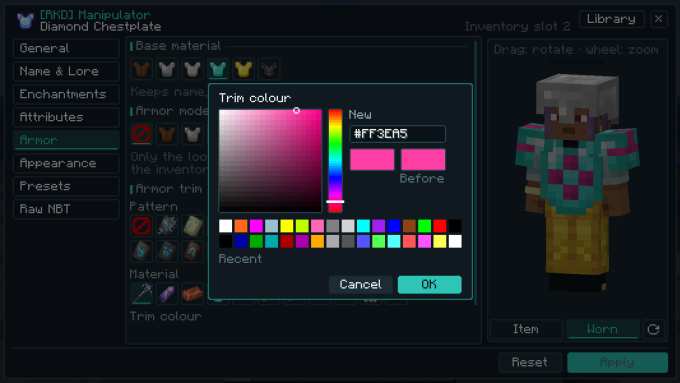
Swap the base material (iron → netherite), the look of another material with the same protection, armour trims with every pattern plus a free colour, leather dye in RGB.
Trims for modded armour (new in 1.1.1)
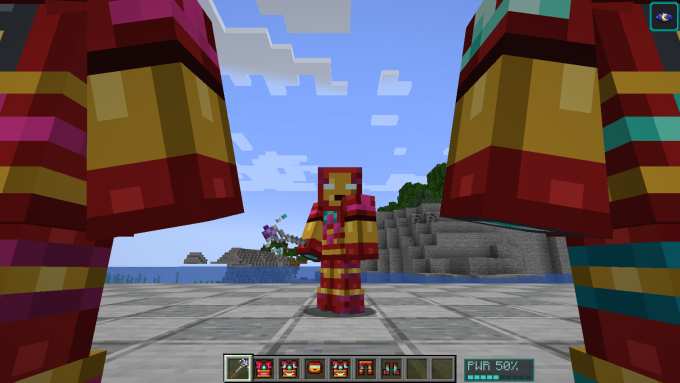
Armour trims and the free trim colour now also work on armour from other mods, e.g. [RKD] Iron Suit – with the preview worn and as an item.
Looks
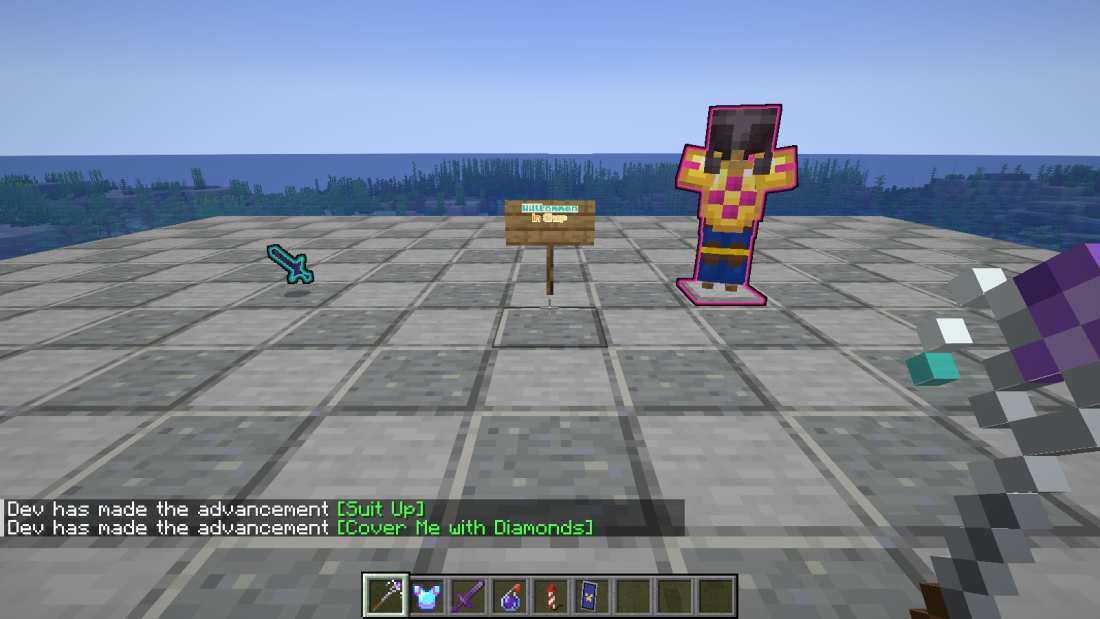
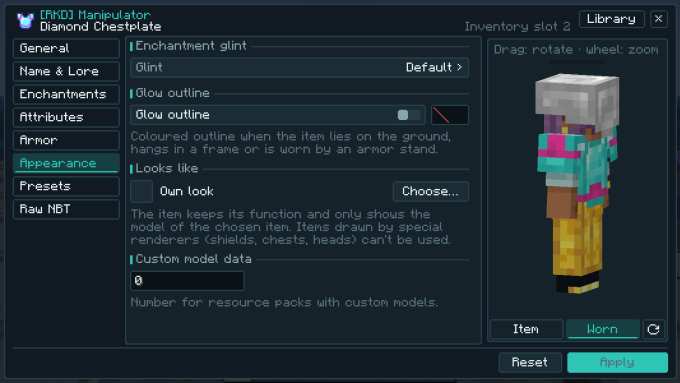
Enchantment glint on/off, a coloured glow outline, “looks like” another item, custom model data.
Special items
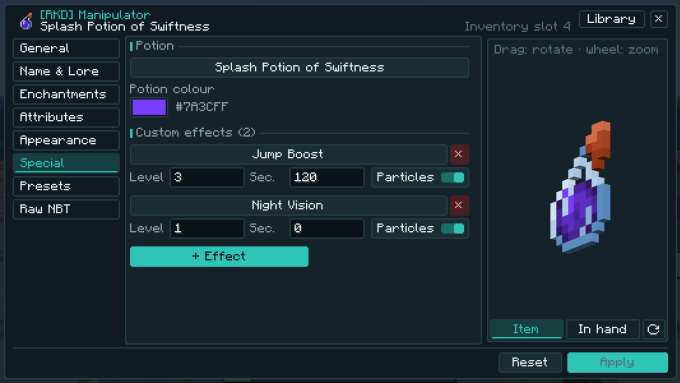
Potions and arrows, fireworks, banners and shields with up to 16 pattern layers, player heads, books, maps.
Blocks
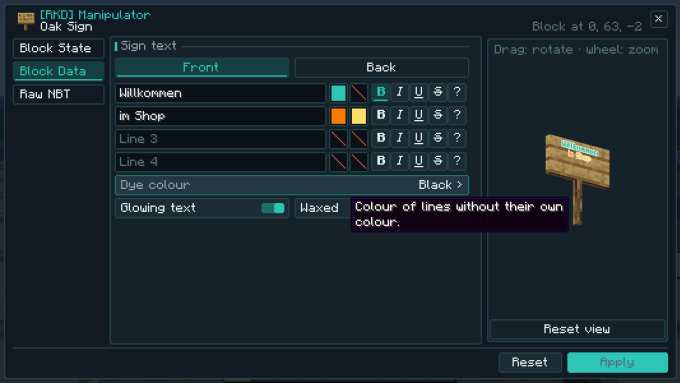
Block states, sign texts with colours and glowing text, banners, container names, spawners, beacons – and raw NBT for those allowed.
Preset library
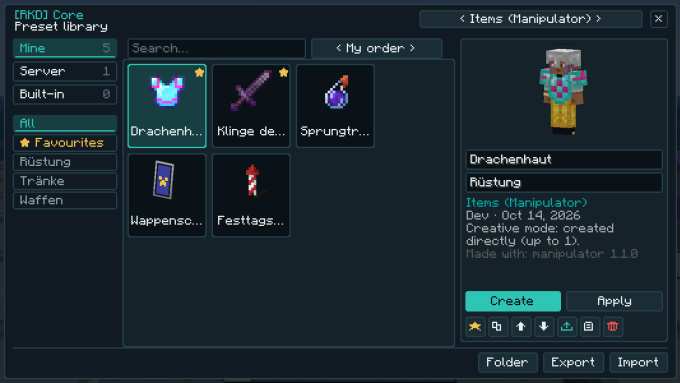
Save designs, sort them in folders, mark favourites, share them as text; in survival create from a preset by bringing the base item and paying levels.
Safe for servers
Who may edit items, blocks or raw NBT is configurable; before applying, the server checks that exactly the same thing is still at the target – no duplication.
Preview
![Trims for modded armour (new in 1.1.1): [RKD] Iron Suit with a trim in a free colour, worn on the figure on the right.](images/besatz_mod.jpg)
Controls
| Input | Effect |
|---|---|
| Manipulator in hand, right-click an item on the ground | edit this item |
| Right-click a block | the block (state, sign, banner, name, spawner, beacon …) |
| Right-click an item frame or armour stand | the item in it |
| Sneak + right-click into the air | the item in the other hand – if it is empty: preset library |
| In the inventory: pick up the Manipulator, right-click an item | exactly that item (also in a chest, barrel, shulker box) |
| Preview: drag · mouse wheel | rotate · zoom |
| Apply or Ctrl+Enter · Reset | send to the server · discard |
The key “Manipulator: item presets” (Controls, unbound by default) opens the preset library directly. In survival mode the level cost is shown on the Apply button; creative players and operators pay nothing.
Items & Recipes
Recipes
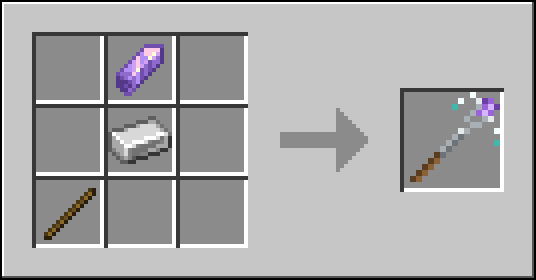
Amethyst shard top right, iron ingot below it, stick bottom left.Crafting Table · rendered from the game textures
Settings
Every option can be changed in game: Mods → [RKD] Manipulator → Config (via Kobase Core). Server options apply to all players; client options are set by each player – options marked lockable can be fixed by the server for everyone.
| Option | Meaning | Default |
|---|---|---|
Who may edit itemspermissions.itemsSERVER | Operators, creative mode (operators and creative players) or everyone (survival players pay levels and only change what the survival options allow). | Creative mode Operators / Creative mode / Everyone |
Who may edit blockspermissions.blocksSERVER | Block states, signs, banners, names, spawners… in the world. | Creative mode Operators / Creative mode / Everyone |
Who may edit raw NBTpermissions.rawNbtSERVER | Raw SNBT of items and blocks: disabled, operators, or operators and creative players. | Operators Nobody / Operators / Creative mode |
Survival: stack sizesurvival.allowCountSERVER | Survival players may change the stack size (duplicates items!). | off |
Survival: repairsurvival.allowRepairSERVER | Survival players may repair items and make them unbreakable. | off |
Survival: materialsurvival.allowMaterialSwapSERVER | Survival players may change the base material (e.g. iron to netherite). | off |
Survival: enchantmentssurvival.allowEnchantmentsSERVER | Survival players may add and change enchantments. | on |
Survival: vanilla rulessurvival.vanillaEnchantRulesSERVER | Enchantments of survival players: fitting item, vanilla max level, no incompatible pairs. | on |
Survival: attributessurvival.allowAttributesSERVER | Survival players may add attribute modifiers. | off |
Survival: potionssurvival.allowPotionEffectsSERVER | Survival players may change potion types and effects. | off |
Survival: block statessurvival.allowBlockStatesSERVER | Survival players may change block states (e.g. crop age); text, names and banners are always allowed. | off |
Survival: create from presetssurvival.allowPresetCreateSERVER | Survival players may create items from presets: the plain base item is taken from the inventory and the level cost of all features is paid. | on |
Levels per changecost.perChangeSERVER | Experience levels a survival player pays for every applied change. | 1 range 0 – 100 |
Levels per enchantment levelcost.perEnchantLevelSERVER | Extra levels per added enchantment level. | 1 range 0 – 100 |
Levels per attributecost.perAttributeSERVER | Extra levels per added attribute modifier. | 3 range 0 – 100 |
Levels for materialcost.materialSwapSERVER | Extra levels for changing the base material. | 5 range 0 – 100 |
Max enchantment levellimits.maxEnchantLevelSERVER | Highest enchantment level (vanilla stores up to 255). | 255 range 1 – 255 |
Incompatible enchantmentslimits.allowIncompatibleEnchantsSERVER | Allow incompatible enchantments together (e.g. Sharpness + Smite). | on |
Max attribute amountlimits.maxAttributeAmountSERVER | Largest amount of one attribute modifier (±). | 1024 range 1 – 1000000 |
Max attribute modifierslimits.maxAttributeModifiersSERVER | Most attribute modifiers on one item. | 16 range 0 – 64 |
Max lore lineslimits.maxLoreLinesSERVER | Most lore lines on one item. | 16 range 0 – 64 |
Max NBT sizelimits.maxNbtBytesSERVER | Largest NBT (bytes) of an edited item or block. | 65536 range 1024 – 2097152 |
Forbidden itemslimits.itemDenySERVER | Items (ids or #tags) that cannot be edited, used as material or as look. | minecraft:command_block, minecraft:chain_command_block, minecraft:repeating_command_block, minecraft:command_block_minecart, minecraft:structure_block, minecraft:jigsaw, minecraft:debug_stick |
Forbidden enchantmentslimits.enchantDenySERVER | Enchantments (ids or modid:*) that cannot be added. | empty |
Forbidden attributeslimits.attributeDenySERVER | Attributes (ids or modid:*) that cannot be added. | empty |
Forbidden spawner creatureslimits.entityDenySERVER | Creatures (ids or modid:*) that cannot be set in spawners. | minecraft:ender_dragon, minecraft:wither |
Operators ignore limitslimits.opsBypassSERVER | Operators ignore the limits and deny lists. | on |
Glow outlinesdisplay.glowOutlinesCLIENTlockable | Show the glow outline of dropped items, item frames and armor stands. | on |
Wearers glowdisplay.wearerGlowCLIENTlockable | Players and mobs wearing or holding a glowing item glow too (visible through walls). | off |
Changed looksdisplay.customLooksCLIENTlockable | Show changed item looks and armor models (off = original look). | on |
Rotate previeweditor.autoRotateCLIENT | Slowly rotate the 3D preview in the editor. | on |
Compatibility
| Minecraft | 1.20.1 |
|---|---|
| Mod loader | Forge 47.2 or newer |
| Kobase Core | included in the mod jar (1.1.0 up to (not incl.) 2.0.0) – nothing extra to install |
| Installation | On the server and all clients (one jar for both, [RKD] Core is built in). |
| Modpacks | CJ_SimpleMod · Modpack D+J |
Limits: modded armour with its own 3D model (e.g. GeckoLib) keeps its model when the look is swapped; items with a special renderer (shields, chests, heads …) can't be chosen for “looks like”; double chests can't be edited with an inventory click.
Versions
- v1.0.0 Item and block editor with a live 3D preview: name & text, enchantments, attributes, armour, looks, special items, raw NBT; permissions and survival rules.
- v1.1.0 Preset library of [RKD] Core (mine/server/bundled, folders, favourites, sharing as text), creating from presets in survival, editing right in the inventory with a click; takes over presets from 1.0.
- v1.1.1 Armour trims (also in a free colour) for armour from other mods, e.g. [RKD] Iron Suit.